

Introduction
In web development, Vue.js has earned a reputation for being approachable and flexible. You can drop it into a page with a script tag or scaffold a full SPA with Vite in minutes.
That flexibility is great for getting started, but once an app grows beyond a handful of routes, it can start to create friction. Every new page needs routing definition, state needs to survive server-side rendering, and code-splitting becomes your responsibility instead of the framework’s.
This is where Nuxt comes in. It takes Vue’s component model and wraps it in a meta-framework where routing, rendering, server handling, and state management are handled by convention rather than configuration. In this Introduction, we’ll explore the key features of Nuxt and build a small example along the way.
Why Nuxt?
Nuxt is a framework built on top of Vue 3, designed to solve the architectural problems that plain Vue often leaves to the developer: routing, rendering strategy, and full-stack structure. It follows a convention-over-configuration philosophy which means if you put a file in the right folder, Nuxt already knows what to do with it.
One area where this matters concretely is SEO. In traditional SEO, a plain Vue SPA can be harder to index consistently because meaningful content may only appear after client-side JavaScript runs. Nuxt addresses this through server-side rendering and static generation, so pages can arrive as complete HTML with content visible immediately to crawlers and users.
Nuxt also supports what people often call AI SEO or AEO from a technical perspective, because it can output crawlable HTML, stable routes, metadata, and structured content that AI systems and search engines can parse more reliably. In other words, Nuxt does not “do AI SEO” by itself, but it provides the technical foundation that helps content be understood by both traditional search engines and AI-powered discovery systems.
Core Fundamentals
Nuxt relies on file-system conventions rather than decorators, but the idea is similar: files and folders act as signals that tell the framework how to wire everything together.
- File-based routing. Drop a file into pages/, and that becomes a route. No router config, no manual imports. pages/about.vue becomes /about.
- Layouts. A layout wraps a page’s shared UI shell, such as navbar or footer. Pages can opt into one with a line like definePageMeta({ layout: ‘minimal’ }).
- Composables and auto-imports. Shared logic lives in composables/, and Nuxt auto-imports it along with Vue’s ref(), reactive(), and computed() into any component that needs them.
- Nitro. Nuxt’s built-in server engine lets you write API endpoints inside the same project, under server/api/, without standing up a separate Express server.
Together, these features let you spend less time on scaffolding and more time on the actual product.
Rendering Strategies
One of Nuxt’s most important strengths is that it lets you choose a rendering strategy per route instead of forcing one mode across the entire app.
- SSR (Server-Side Rendering) is the default. The server runs your Vue components, fetches data, and sends complete HTML to the browser. Vue then hydrates that HTML to make it interactive.
- SSG (Static Site Generation) is ideal for content that rarely changes, such as marketing pages or documentation. Nuxt pre-builds the HTML at build time and serves static files.
- Hybrid rendering gives you the most flexibility. You can mix rendering modes per route in a single configuration.
To make the difference concrete, here’s what happens during page load under each approach:
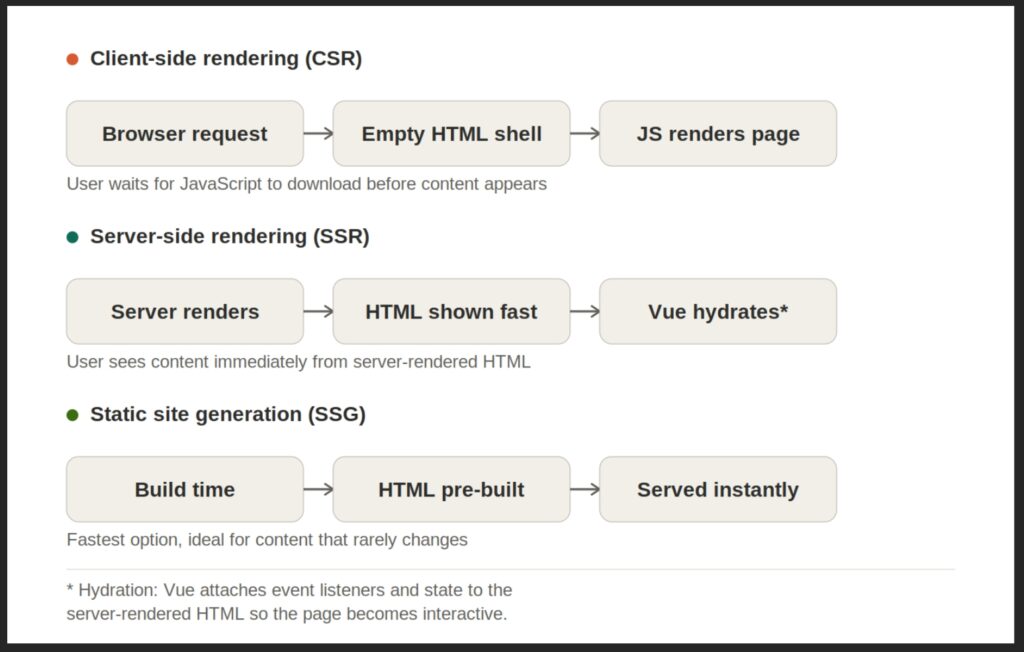
With CSR, the user (and most crawlers) initially sees only a basic HTML shell, and meaningful content appears only after JavaScript has finished downloading, executing, and rendering the page. With SSR, the HTML is already rendered on the server before it is sent, so the browser can display real content immediately instead of a blank shell.
Hybrid rendering takes this further by letting you mix different rendering modes per route in a single configuration:
// nuxt.config.ts

export default defineNuxtConfig({

  routeRules: {

    '/': { prerender: true },        // SSG -- static landing page

    '/blog/**': { isr: 3600 },       // ISR -- regenerate hourly

    '/dashboard/**': { ssr: false }, // SPA -- client-only, behind auth

    '/api/**': { cors: true },       // API -- server routes

  }

})
With this setup, one codebase can serve a static landing page as static, a frequently updated blog, a client-only dashboard, and server APIs without separate infrastructure.
A Small CRUD Example
To see these pieces working together, let’s look at a small training project: a form page that performs full CRUD against an API, structured the way a real Nuxt app might be.
The project structure:
app/

  pages/

    index.vue       -> /

    about.vue       -> /about

    form.vue        -> /form

  layouts/

    default.vue     -> navbar + footer (auto-applied)

    minimal.vue     -> pill nav, no footer (opt-in)

  composables/

    useTodo.ts       -> shared CRUD logic (auto-imported)
There are three pages, two layouts, one composable. Nuxt wires up the routes and layout switching automatically.
The form page opts into the minimal layout:
// pages/form.vue

<script setup lang="ts">

definePageMeta({ layout: 'minimal' })

</script>
The CRUD logic lives in a composable, with no manual import needed in the component that uses it:
// composables/useTodo.ts

export async function useTodo() {

  const { public: { apiBase } } = useRuntimeConfig()

  const form = reactive({ name: '', avatar: '' })

  const editingId = ref<string | null>(null)


  const { data, pending, refresh } = await useFetch<Todo[]>(apiBase)


  async function create() {

    await $fetch<Todo>(apiBase, {

      method: 'POST',

      body: { name: form.name, avatar: form.avatar },

    })

  }
  async function update(id: string) {

    await $fetch<Todo>(`${apiBase}/${id}`, {

      method: 'PUT',

      body: { name: form.name, avatar: form.avatar },

    })

  }


  async function remove(id: string) {

    await $fetch(`${apiBase}/${id}`, { method: 'DELETE' })

    await refresh()

  }


  function resetForm() {

    form.name = ''

    form.avatar = ''

    editingId.value = null

  }


  async function handleSubmit() {

    editingId.value ? await update(editingId.value) : await create()

    await refresh()

    resetForm()

  }


  function startEdit(todo: Todo) {

    editingId.value = todo.id

    form.name = todo.name

    form.avatar = todo.avatar

  }


  return { data, pending, form, editingId, handleSubmit, remove, startEdit, resetForm }

}
A few things are worth noting here:
- useRuntimeConfig() reads environment values safely, including on the server, no process.env workarounds.
- useFetch() handles SSR data fetching, caching, and hydration in one call.
- $fetch() is a universal HTTP client that works the same on server and client.
- The composable is auto imported, so the form page can simply call: const { data, form, handleSubmit } = await useTodo()
If you want to host your own API instead of calling an external one, Nitro lets you add a server route directly:
// server/api/articles/[id].get.ts

export default defineEventHandler(async (event) => {

  const id = getRouterParam(event, 'id')

  const article = await db.article.findUnique({ where: { id } })


  if (!article) {

throw createError({ statusCode: 404 })

  }


  return article

})
There is no separate Express setup here. Frontend and backend live in the same codebase.
NUXT vs Vue + Vite
| Feature | Vue + Vite | Nuxt | Why It Matters |
| Routing | Manual config, every route is code | File-based drop a .vue file, get a route | Less boilerplates, fewer routing bugs |
| Data fetching | Manual client/server logic, hydration mismatches | useFetch / useAsyncData handle SSR + caching | Predictable behaviour regardless of rendering mode |
| Backend | Separate server such as Express, separate deployment | Built-in server/api/ directory, one deployment | Unified codebase, less infrastructure to manage |
| Rendering | CSR by default; SSR needs custom setup | SSR, SSG, ISR, SPA — chosen per route | The right strategy for each page, one config |
Compared to Next.js, Nuxt is solving similar problems from a Vue-first starting points. If your team already knows Vue, Nuxt is often the more natural fit. Its routeRules config keeps rendering strategy in one place, and Nitro can deploy across a wide range of platforms with minimal configuration
Closing Thoughts
Nuxt is more than Vue with extra features bolted on. It’s an opinionated layer that handles routing, rendering, and server logic so those decisions don’t have to be made repeatedly on every project.
By combining file-based conventions with flexible per-route rendering, Nuxt lets teams spend less time on plumbing and more time on the actual product. For teams already comfortable with Vue, picking up Nuxt is a small step that solves a long list of common problems and scales cleanly from a single landing page to a full application with its own backend.
At Mitrais, our frontend teams work with Nuxt, Vue 3, and TypeScript on a regular basis across client projects in Australia, Japan, and the Asia-Pacific region. If you’re weighing whether to adopt Nuxt for an existing app or a new one, we’re happy to talk through the trade-offs.
Author: Kresnata Adi, Mitrais