

Introduction: Why Distributed Load Testing Matters
Imagine you have an application that is expected to be accessed by more than 1 million users simultaneously. How do you test whether the application, including the architecture, can handle such a huge number of requests and is ready to be released? The solution is to perform performance testing.
A common tool for performance testing is JMeter. JMeter is a favorite among testers because it’s free and open source, which means you can customise it to fit almost any need. It supports testing across many different protocols and gives you detailed, easy-to-understand reports. Plus, there’s a big community around it, so you’re never far from tips, plugins, and support. All of this makes JMeter a reliable and practical choice for load testing.
However, a single JMeter machine can typically generate only around 1,000 to 2,000 requests simultaneously due to hardware limitations like CPU, memory, and network bandwidth. So, can we utilise other machines and distribute the load? That’s where JMeter’s Master-Slave (Distributed) Testing comes in. This approach allows distributing the load generation across multiple machines (slaves), all coordinated by a master node. This setup overcomes the limitations of a single machine and lets you simulate large-scale, realistic traffic patterns efficiently and accurately, ensuring your application can handle real-world user demand.
But setting up and managing multiple slave machines can be time-consuming and complex. Enter AWS EC2, a cloud platform that can rapidly provision and scale virtual machines, we can deploy and manage JMeter slave nodes on-demand. This article will guide you through the fundamentals of the Master-Slave JMeter approach and show you how to leverage AWS EC2 to accelerate and automate your distributed load testing.
What is the Master-Slave JMeter Architecture?
What is the Master-Slave Setup?
When diving into JMeter’s distributed testing, the master-slave architecture is where the magic happens. Think of the Master Node as the conductor of an orchestra. It’s the control centre that directs the entire test execution, distributing the test plans to the musicians and collecting all the results. The Slave Nodes, are like the musicians who play their parts simultaneously, running the test scripts on their own machines to generate real load on your application. This collaborative setup allows you to simulate heavy traffic by harnessing the combined power of multiple machines
How It Works
- The Master Takes Charge – The master node distributes the test plan to all slaves, ensuring everyone’s on the same page.
- Slaves Ramp Up the Pressure – Each slave fires off requests to your target system, simulating real users hitting your app from different locations.
- Results Come Flooding In – Slaves send performance data (response times, errors, etc.) back to the master for consolidation.
- Master Crunches the Numbers – The master compiles all results into a single report, giving you a clear picture of how your system handled the load.
Benefits
- Scalability: easily scale load generation by adding more slaves.
- Resource Distribution: spread CPU, memory, and network load across multiple machines.
- Realistic Testing: simulate geographically distributed users by deploying slaves in different regions.
Architecture Design
High level architecture
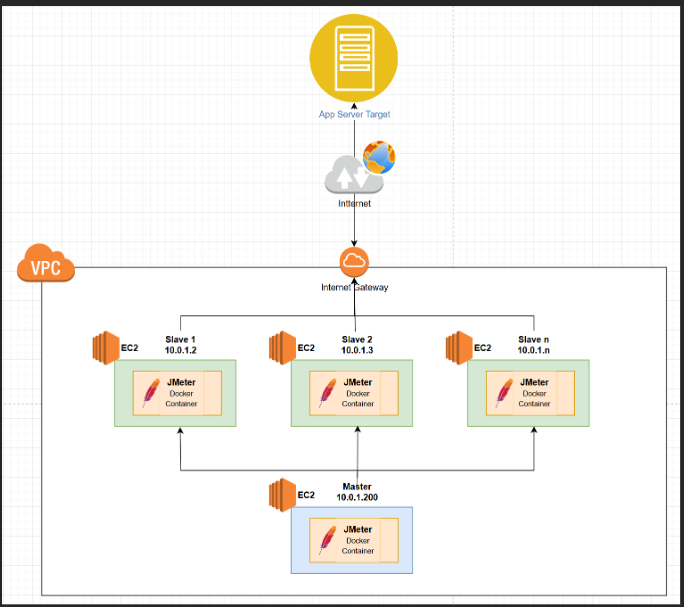
In our performance testing setup, we use multiple AWS EC2 instances configured within a Virtual Private Cloud (VPC). The Master node runs on an EC2 instance with the private IP address 10.0.1.200, while the Slave nodes run on several other EC2 instances with private IPs such as 10.0.1.2, 10.0.1.3, up to 10.0.1.n. You are free to set private IP as your own. All these instances reside inside the same VPC to ensure secure and efficient internal communication.
Note: You can configure the private IP addresses according to your network preferences, such as using ranges like 192.xxx.xxx.xxx to fit your infrastructure design.
To provide internet connectivity and enable our test traffic to reach the target application server outside the VPC, the VPC is connected to the internet via an Internet Gateway. When the distributed JMeter slaves generate load, the requests flow from these EC2 instances through the internet gateway and eventually hit the target application servers, simulating real-world access patterns.
This architecture ensures that the master controls and coordinates distributed load generation across multiple slave instances while maintaining secure and scalable network communication within AWS infrastructure.
Communication between Master (Client) to Slaves
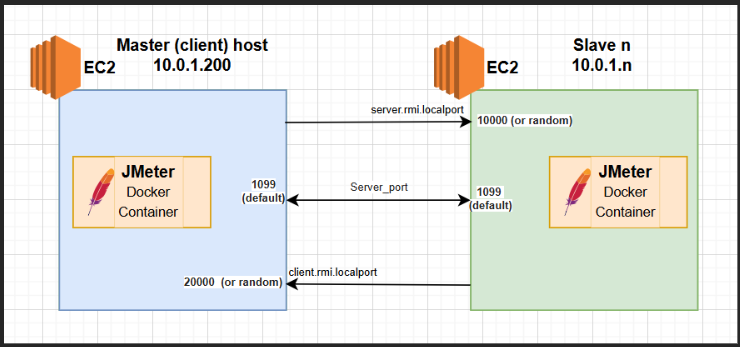
In this setup, the communication between the JMeter Master and Slave nodes running separate EC2 instances is established through designated network ports. On the left, the Master node operates on an EC2 instance where port 1099 is open as the default RMI (Remote Method Invocation) server port, enabling incoming connections from slaves. Additionally, the Master opens a dynamic or specified port, such as 20000, for the client.rmi.localport to facilitate client-side RMI communication. On the right, each Slave node runs on its own EC2 instance, also opening port 1099 as its default server port to accept RMI calls from the Master. Each Slave further utilises its own dynamic or configured port—like 10000 for the client.rmi.localport—to handle the remote method calls back to the Master. This bi-directional communication, secured by these ports, allows the Master to distribute the test plans efficiently and collect results, while Slaves execute the load tests concurrently.
Master Server Configuration
| Setup item | Master (Client) host |
| Security group | Open port 1099 and port 20000 for Slave’s security group
|
| Script | jmeter -n -t file_name.jmx -Djava.rmi.server.hostname=10.0.1.200 -Dclient.rmi.localport=20000 -R10.0.2.10,10.0.3.11,10.0.n -Jserver.rmi.ssl.disable=true |
Slave Server Configuration
| Setup item | |
| Security group | Open port 1099 and port 10000 for Master’s security group
|
| Script | docker run -dit –name slave -e LOCALIP=’10.0.1.2′ -p 1099:1099 -p 10000:10000 jmeter-slave /bin/bash Note: to set docker container using defined private IP (e.g. 10.0.1.2) |
Example Case
In this example, the goal is to simulate 20,000 unique requests to our application, which requires each request to have its own distinct data. To achieve this efficiently, we set up a distributed JMeter environment on AWS using multiple EC2 instances.
We started with one Master instance (t3.medium) to manage the test execution and coordination. Then we launched five Slave instances, each also using t3.medium. Based on performance observations, a single t3.medium can handle roughly 4,000 requests concurrently. By leveraging five slaves, we can multiply this capacity to reach the total of 20,000 requests needed.
Since each request must be unique, we prepared the data by creating a CSV file containing 20,000 dummy records. We split this data into five smaller CSVs, each with 4,000 unique entries, and distributed one CSV file to each slave instance. This way, each slave sends its own set of unique requests, ensuring data integrity and realistic test simulation.
This approach balances the load across multiple machines, efficiently manages unique test data, and showcases how distributed testing can scale to meet demanding performance requirements.
Conclusion
The Master-Slave JMeter approach is a powerful method to simulate large-scale load testing by distributing the workload across multiple machines. By integrating this approach with AWS EC2, you can unlock the ability to rapidly deploy, scale, and manage your slave nodes in the cloud, making your performance testing more efficient, flexible, and cost-effective. While AWS is a popular choice due to its extensive ecosystem and scalability, other cloud providers such as Microsoft Azure, Google Cloud Platform, and IBM Cloud offer similar capabilities, giving you the flexibility to choose the infrastructure that best fits your needs.
Whether you’re testing a small API or a massive web application, combining JMeter’s distributed testing capabilities with AWS’s cloud infrastructure empowers you to push your systems to their limits with confidence.